Notesnook Obsidian Quartz Conversion
notesnook obsidian quartz wiki project notes
Notesnook Github Vercel project private wiki
WIKI Setup Complete Hetzner VPS Deployment Guide lumo
My Cloudflare Quartz Build
https://quartzonemoregoddamntime.pages.dev/
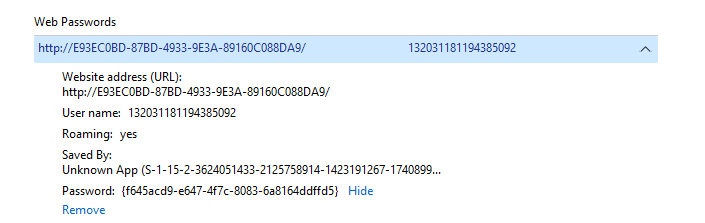
strange stuff that popped up in credential manager on windows
can i incorporate my hetzner nextcloud https://nx83402.your-storageshare.de/login
Dev Site in Progress on Vercel
https://quartz-3auv.vercel.app
From whereby’s quartz repo
https://github.com/wherebyanalytics/quartz
trying to shift to goodoleusa on github for anonymity even if whereby’s repo is private
https://github.com/goodoleusa/quartzy
notesnook obsidian quartz wiki project notes
Githubs to Reconcile
Sanity: This is to Create Knowledge Garden Wiki to Help Writing
converted on phone to correct format, can i replicate on comp? It was messing up last time I think because not everything is for sure UTF 8 encoded? how to ensure this.
How to Go from Notesnook —> Obsidian —> Quartz —> Git —> Site
-
export from notesnook md (front matter?)
-
import to obsidian as vault. ensure images wotk etc. it doesnt like copy paste screenshots. absolute file paths.
-
Linter - follow quartz hugo yaml rules. escape characters in docs?!
-
quartz sync command to push to git
-
vercel reflects latest pushes
Notesbook Md no Frontmatter Export File
md-nofront-nn-export-173-1763270349040.zip
Inspiration
https://www.ssp.sh/brain/quartz-publish-obsidian-vault/
https://notes.nicolevanderhoeven.com/How+to+publish+Obsidian+notes+with+Quartz+on+GitHub+Pages
Alternatives to Obsidian Sync
https://www.ssp.sh/brain/open-source-obsidian-publish-alternatives
From Quartz Docs
How to Setup the Obsidian Vault
Obsidian is the preferred way to use Quartz. You can either create a new Obsidian Vault or link one that your already have.
New Vault
If you don’t have an existing Vault, download Obsidian and create a new Vault in the /content folder that you created and cloned during the setup step.
Linking an Existing Vault
The easiest way to use an existing Vault is to copy all of your files (directory and hierarchies intact) into the /content folder.
Settings
Great, now that you have your Obsidian linked to your Quartz, let’s fix some settings so that they play well.
-
Under Options > Files and Links, set the New link format to always use Absolute Path in Vault.
-
Go to Settings > Files & Links > Turn “on” automatically update internal links.
Front Matter
Hugo is picky when it comes to metadata for files. Make sure that your title is double-quoted and that you have a title defined at the top of your file like so. You can also add tags here as well.
| | ```markdown
title: “Example Title” tags:
- example-tag enableToc: false # do not show a table of contents on this page
Rest of your content here…
| ---------------------------------------------------------------------------------------------------------------------------------------------------------------- | ---------------------------------------------------------------------------------------------------------------------------------------------------------------- |

### On Templates — first I need to Linter all my files

Inserting front matter everytime you want to create a new Note gets annoying really quickly. Luckily, Obsidian supports templates which makes inserting new content really easily.

**If you decide to overwrite the `/content` folder completely, don’t remove the `/content/templates` folder!**

Head over to Options > Core Plugins and enable the Templates plugin. Then go to Options > Hotkeys and set a hotkey for ‘Insert Template’ (I recommend `[cmd]+T`). That way, when you create a new note, you can just press the hotkey for a new template and be ready to go!


## no frontmatter md converts fine, images work

now npx build quartz

then get commit when ready

## Host: render? git pages? hetzner group share?

how far can i extend hetzner nextcloud

do i have to burn the server cuz im fuckin stupid

ssh?! kali? somethin else??


## My Cloudflare Quartz build

[https://quartzonemoregoddamntime.pages.dev/](<https://quartzonemoregoddamntime.pages.dev/> "https://quartzonemoregoddamntime.pages.dev/")


## Backlinks

[notesnook obsidian quartz wiki project notes](<nn://note/691c912663295a14bbef5827> "notesnook obsidian quartz wiki project notes")

[Notesnook Github Vercel project private wiki](<./../../../2-Drafts/2-2_Active Article 1/Notesnook-Github-Vercel-project-Create-private-wiki-and-push-from-Squircle-editor-proto-version.md> "Notesnook Github Vercel project private wikk")

[WIKI Setup Complete Hetzner VPS Deployment Guide lumo](<./WIKI-Setup-Complete-Hetzner-VPS-Deployment-Guide-Gollum-lumo.md> "WIKI Setup Complete Hetzner VPS Deployment Guide lumo")

[wiki options](<./../WEBSITE for CYBER REPORT files/wiki-options.md> "wiki options")


C:\Users\amand\quartzonemoregoddamntime\quartz\content